Posts

Showing posts with the label SharePoint 2013

Add ribbon action and item context menu actions to site content type
Image
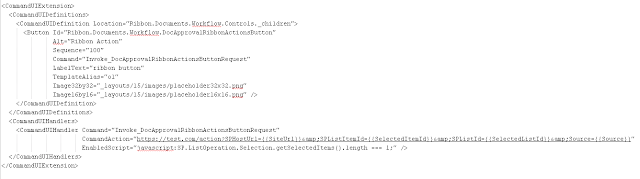
I haven't done this for a while and I was searching for it for a while and not getting the correct answer.  So, once I found it, I have to put the information in here just to remind myself later if I have to do it again sometime in the future. Below are functions to add ribbon action and context menu action to Document content type on the site collection level.  The actions requires edit list permission to see. For the ribbon, you'll be passing in the command for the ribbon which looks something like: private static void addRibbonActionToContentType(ClientContext clientContext, ContentType ct, string cmd, string actionName, string actionText)         {             // create the ribbon.             UserCustomAction customAction = clientContext.Site.UserCustomActions.Add();             customAction.Name = actionName;           ...

SharePoint 2013 Performance Issue - Very slow when updating Enterprise Keywords field

Our SharePoint 2013 environment was behaving very slowly and one of the WFE utilization is crazy high.  It is particularly obvious when publisher is trying to update the Enterprise Keywords field (Managed Metadata field) for French site. After working with MS on troubleshooting, the root cause is identified as Outdated database statistics. Refer to this article for reference: https://support.microsoft.com/en-us/kb/3103194. Basically, we update the database statistics and remove cache following the article to execute the following. -- Update DB Stats EXEC sp_MSforeachtable 'UPDATE STATISTICS ? WITH FULLSCAN' -- Remove all elements from the plan cache DBCC FREEPROCCACHE This should be part of your DB maintenance on regular basis.

Add spell check dictionary in SharePoint 2010, SharePoint 2013, and Office 365

I was looking for how to add custom spell check dictionary in SharePoint 2013 and I found this blog that describes it, http://softlanding.ca/blog/adding-words-to-the-sharepoint-spell-checker-dictionary-(sharepoint-2013-2010). Here is the summary steps in case the above link doesn't work any more. At the root level of your site create a document library called " Spelling " (make sure to name the document library exactly as listed here) On your desktop create a new text file called " Custom Dictionary ", so that the file name looks like " Custom Dictionary.txt " (make sure to spell the file name exactly as listed here) Open the " Custom Dictionary " text file and in this file type in the words you would like NOT to be considered misspelled words (please note that the words are case sensitive so I would have a separate entry for Softlanding and softlanding, and also please make sure each word is listed on a new line) Upload the " C...

SharePoint 2013 REST API Query Items with cross site lookup column

Recently, I had to query items using SharePoint 2013 Rest API (/api/web/lists/getbytitle('')/items).  The problem that makes it hard is that it has a lookup column (Product) that looks up the items in a list from another web.  The typical $filter statement (/_api/web/lists/getbytitle('Pages')/items?$select=Title,Id&$filter=Product eq 1) doesn't work. After searching online and a few trial/error, I got it working by using /_api/web/lists/getbytitle('Pages')/items?$select=Title,Id,ProductId&$filter=Product eq 1 The ProductId field is automatically added to the list by SharePoint when you have a lookup field.  You have to $select that ProductId and then you can filter the Product field.  It's weird but it works.

SharePoint 2013 Client Side Rendering

I was looking for ways to add a custom field type using SharePoint app approach.  I found the following two good article that explain how it can be done.  With the app model, the custom field type control is just not possible any more. So, this is the way. http://blogs.technet.com/b/sharepointdevelopersupport/archive/2013/04/09/how-to-add-a-custom-field-to-blog-posts-in-sharepoint-2013.aspx http://code.msdn.microsoft.com/office/Client-side-rendering-JS-2ed3538a Client side rendering actually helps to easily change how a list renders its items as well.  All this technique should work for Office 365 or SharePoint online.

SharePoint 2013 and Visual Studio 2015

If you want to setup a SharePoint 2013 development environment with Visual Studio 2015.  It will be mandatory to install and setup your SharePoint 2013 first then install visual studio 2015.  VS 2015 install .NET 4.6 and it will cause issue when installing SharePoint 2013.  As SharePoint 2013 is looking for .NET 4.5 (probably hardcoded somewhere) and when it can't find it, it can't be installed. You can refer to this blog for more information. http://geekswithblogs.net/bjackett/archive/2015/07/28/be-careful-installing-.net-4.6--visual-studio-2015-with.aspx I found out the hard way and it took me a while to uninstall Visual Studio 2015 and uninstall .NET 4.6 before I can successfully install SharePoint 2013. So be aware, the order matters!!!!

SharePoint 2013 Custom web part with rich text box that triggers SharePoint ribbon

I was creating a web part form which needs to have a rich text editor text box.  The SharePoint 2013 ribbon style works well and looks good.  So, I was looking to utilize it.  To keep the story short, I found the solution in a post, http://sharepoint.stackexchange.com/questions/64698/rich-text-editor-ribbon-based-in-a-webpart-in-sharepoint-2013. In case the link disappeared later, I copied the solution below. ASPX / ASCX: id = "editor" > id = "RTEDiv" tabindex = "0" > ID = "RTEDivHidden" runat = "server" /> class = "commands" > ID = "btnSubmit" Text = "Отправить" runat = "server" CssClass = "editorbtn" /> type = "button" value = "Отмена" id = "btnCancel" class = "editorbtn" /> Simple div container, future rich text div  id="RTEDiv" , hidden field to ...

SharePoint 2013 Using Publishing Page as custom forms for content type

I wanted to customize the display, edit, and new form for a custom list.  I took the approach of using a publishing web with custom web part.  The 2 methods that I use to accomplish that are as follow public static void AddWebParts(SPWeb web, string pageUrl, List webParts)         {             using (SPLimitedWebPartManager wpManager = web.GetLimitedWebPartManager(pageUrl, System.Web.UI.WebControls.WebParts.PersonalizationScope.Shared))             {                                 foreach (WebPart webPart in webParts)                 {                     wpManager.AddWebPart(webPart, webPart.ZoneID, 0);                     wpManager.SaveChanges(webPart);     ...

SharePoint 2013 Search Conversation Result Source

If you're wondering exactly what types of data the Out-Of-The-Box (OOTB) Conversation result source actually returns, here are some information that I gather by performing some simple test. The result source ID for Conversations is 459dd1b7-216f-4386-9709-287d5d22f568. It returns the following types of content Personal Newsfeed posts and replies Newsfeed activity posts are also returned which could it a pain. Activity feed is the post that tells people you posted something on a community site. Discussion board posts and replies from community sites Site feed posts and replies from community and team sites (and probably all sites that enable site feed feature)

SharePoint 2013 - Use JSLink to Create Custom Field Type

Image
One of the things that we used to be able to do with server farm solution is to create custom field type and custom field type control.  With the App Model approach, we'll need an alternative way to give us the custom form that we need. SharePoint is using JSLink for a lot of displaying option.  You can specify a JavaScript to be used in a  web part or for a field.  The example below shows how you can create custom displaying field.  The example do the following: It customize the displaying of the Is Separator field to add onclick event handling if the URL field is the default value, it sets the default value for both the URL and the description text box Sample form Below is the JavaScript sample code and I saved it in isSeparator.js //IsSeparator Display (function () {     // Create object that have the context information about the field that we want to change it's output render     var isSeparatorFieldCtx = {}; ...

SharePoint with Angular

I have been working on a SharePoint Intranet project that uses AngularJS. Here is some code sample for using Angular with SharePoint.  The sample code below basically is: Getting a items from a list Searching for items with Title containing "Test" Display the results from the list and search onto the page I have the following files appFactory.js - for handling the services call to SharePoint using both JSOM and REST app.js - the main application logic (including a custom directive) list.html - the html template for my directive The files contain are pasted below. ***appFactory.js********************************* var spServices = angular.module('spServices', []); //Factory with SharePoint call using JSOM spServices.factory('SPRestSearchFactory', ['$resource',   function ($resource) {       return $resource(_spPageContextInfo.siteAbsoluteUrl + "/_api/search/query/:searchtext", { searchtext: '@querytext' }, {   ...

SharePoint Feb 2015 CU causes managed metadata service issue

Image
After applying the Feb CU to SharePoint DEV environment, a few development VMs are having issues with managed metadata services.  Most of the VMs, experience issues on the My Profile Edit page where all the term set properties are getting the following error: There was a problem retrieving data for this field.  Updating values in this field is disabled temporarily.  You can still update values in other fields. Also, if you're trying to enter a hashtag when posting a newsfeed, you'll get The tagging service is currently unavailable, Please try again later. After some investigation, our infrastructure guys figuring out the solution to fix it.  You have to do the following: 1.        Open a Command Prompt window using Farm account and at the command prompt, type:   cd /d %commonprogramfiles%\Microsoft Shared\Web server extensions\15\BIN   2.        Fix the permissions on the server by e...

Delete Term Group using PowerShell

Below is a script that I used to delete a term group and all the term sets within that group. $snapin = Get-PSSnapin | Where-Object {$_.Name -eq 'Microsoft.SharePoint.Powershell'} if ($snapin -eq $null) {   Write-Host "`nLoading SharePoint Powershell Snapin`n"   Add-PSSnapin "Microsoft.SharePoint.Powershell" } function DeleteTermGroup { $centralAdmin = Read-Host "Central Admin Url:" $termstoreName = "Term Store Name" $groupName = Read-Host "Group name" $site = Get-SPSite $centralAdmin $session = new-object Microsoft.SharePoint.Taxonomy.TaxonomySession($site) $termstore = $session.TermStores[$termstoreName] $group=$termStore.Groups[$groupName] $group.TermSets|foreach{ $_.Delete() $termstore.CommitAll() }     $group.Delete() $termstore.CommitAll() Write-Output "Deleted $groupName" } DeleteTermGroup $input = Read-Host "Enter any key to exit" Exit

SharePoint 2013 - Get Variation URL using JSOM

From the variation information on this blog, http://blogs.technet.com/b/stefan_gossner/archive/2011/11/21/sharepoint-variations-the-complete-guide-part-6-configuration-internals.aspx, I used the following code to get the corresponding variation URL to create the toggling button for a publishing site. Type.registerNamespace('spapp'); var context; spapp.url = "https://rchen.sp.com"; spapp.language; spapp.languageHome; spapp.curPageUrl; spapp.relationshipList; spapp.relationshipItems; $(document).ready(function () { var toggleHtml = ' Toggle '; $('#RibbonContainer-TabRowRight').prepend(toggleHtml); SP.SOD.executeFunc('sp.js', 'SP.ClientContext', spapp.init); }); spapp.init = function(){ context = new SP.ClientContext(spapp.url); }; spapp.toggleLanguage = function(){ spapp.curPageUrl = _spPageContextInfo.serverRequestPath; spapp.language = _spPageContextInfo.currentCultureName; spapp.relationshipList = ...